Showing posts with label auto mute. Show all posts

Friday, January 29, 2016

No Sound from Speaker but Headphones Work?

Some notebooks manufactured by ASUS (maybe by other vendors too) have strange issue with sound output. When all required drivers are installed and everything is properly set, you can not hear any sound from the internal speakers. Only plugged headphones or external audio works...

I was trying different tricks. Even soldered new audio jack connector to the motherboard of my ASUS U36SD notebook. I've spent lots of time, but found the solution! It is not a hardware issue. It is software/driver glitch :)

So if you have the same issue with your notebook: no sound from speakers, but headphones works. Here is the solution:

  1. Restart computer.
  2. Open BIOS/Setup console, by pressing F1, F2, F10 or Del key depending on your notebook model.
  3. Choose "Load Default Settings" option at the beginning.
  4. Then search for "Ring on Boot" or "Boot Sound Volume" option(s) and TURN IT OFF or set the volume level to ZERO!
  5. Save BIOS/Setup settings and restart computer again.

Now you can hear sound from the internal speaker of your notebook, laptop or tablet :)

Option to disable to get sound on ASUS notebook

Let me know if this workaround helps you and please specify the model of your notebook in comments. Thank you.

BTW, do you know about my Auto Mute software utility to make computer silent by default? :)

Saturday, January 30, 2010

Auto Mute 2.5

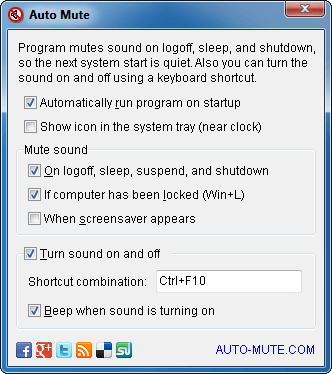
Auto Mute version 2.5 has been released. Now you have an option to turn the sound off when a screensaver appears. Software has different sound control engines for Windows 98/2000/XP and for Windows Vista/2008/7. So the program works correctly on any version of Windows system.

Auto Mute 2.5 screenshot

You can download Auto Mute 2.5 right here, right now (c). Software is absolutely free :)

Download EXE file
Download ZIP Archive

Friday, November 20, 2009

Auto Mute 1.3

I've add some new features to Auto Mute program. Now you'll get a balloon tooltip notification if sound is muted on system startup or resume. Some people ask me to add such reminder, because they always forget to turn the sound on after computer restart.

Auto Mute software screenshot

You can download Auto Mute 1.3 right form this blog. Software is absolutely free.

Download EXE file
Download ZIP Archive

Monday, November 02, 2009

Created just for fun - Auto Mute

I've created small software utility to make notebooks silent when it's turning on or is waking up from a sleep mode. So the computer becomes quiet even if you forgot to turn the sound off in previous session. Very useful if you have small children or are trying to work in public places, on conferences for example.

Actually, this is my old idea of software for people who have small children, but nobody wants to make such tool for years. So if you want to have something you cannot buy, do it by yourself :)

Auto Mute software screenshot

Download EXE file
Download ZIP Archive

Hope this program will be helpful to many people. If you need additional feature or know how to improve this sound control software let me know.